Kooply Run™: Play and Create!
- 4.1
- Rating
- 50.00M
- Installs
- Free
- Price

 Analysis by App-foxy
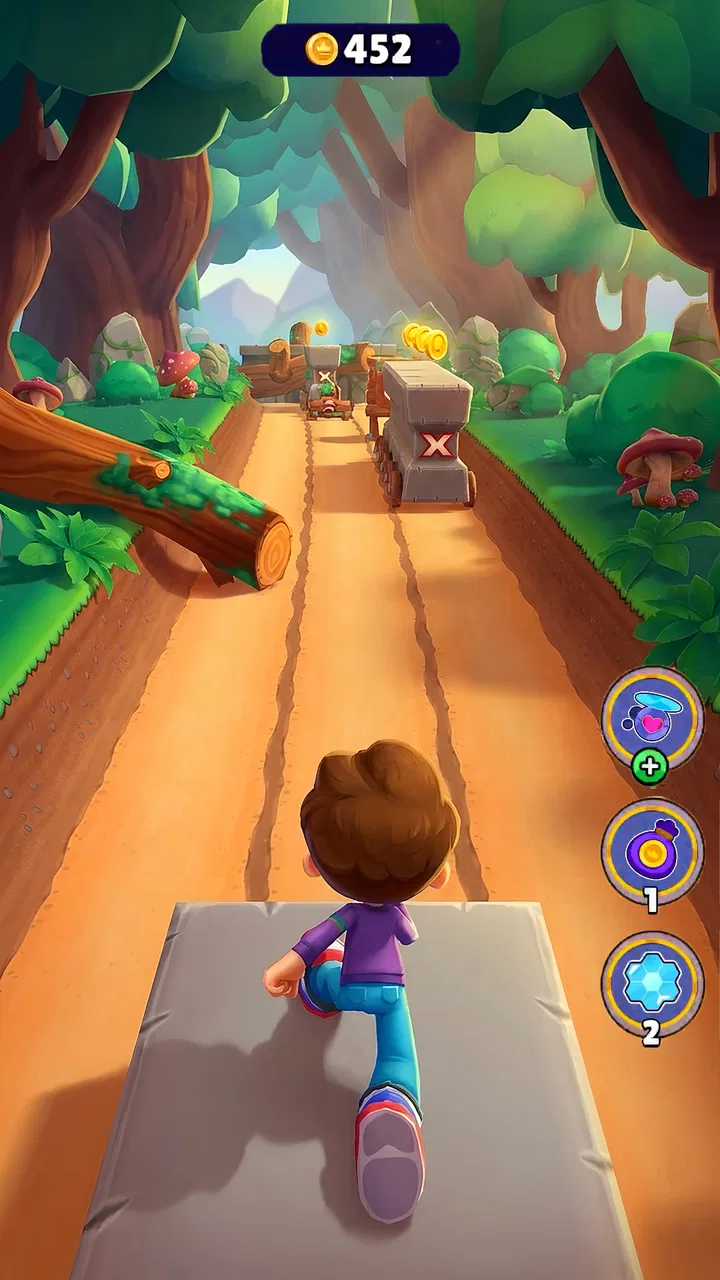
I approached Kooply Run™: Play and Create! as the kind of arcade game I could pick up for a few spare minutes, then gradually spend longer with once I understood its creative side. Its central idea is simple: run through levels, play what other people make, and build stages of your own. That combination gives it a different feel from an ordinary endless runner, because the game is not only asking me to react quickly; it also invites me to think about how a level should flow for someone else.
For a first-time player, the most important expectation is that the game has two distinct moods. Playing is immediate and familiar, while creating takes more patience. I found the first part easy to understand because the goal is presented through movement and timing rather than a long explanation. The creator side is where the lasting interest lies, but it also requires me to slow down and learn how the available pieces work together.
It is listed as a free arcade game from KOOPLY, with an Everyone age rating. The game has reached over 50 million installs and holds a 4.6 average from around 158 thousand ratings, which suggests that its quick-running format and user-created approach have found a broad audience. Optional purchases range from 49 cents to 99 dollars and 99 cents per item, so I would treat the free download as an opportunity to try the core experience before deciding whether anything extra is worthwhile.
You May Also Like

 Blood Strike: 2.5 Anniversary
Blood Strike’s Loadouts Turn Every Drop Into a Tactical Gamble
A close look at Blood Strike’s custom loadouts: how fast access to signature weapons reshapes its battle royale rhythm, rewards preparation, and narrows the gap between fights.

 Pandora - Music & Podcasts
Pandora’s Music Is Easy to Start, but Harder to Recover
Pandora’s strength is its low-effort path from a seed to a station. Its weak spot is how much confidence it asks you to place in connection, setup, and quiet recovery.

 8 Ball Pool
 Is Built on Rivalries, Rematches, and Routine
A close look at the rivalries, rematches, shared routines, and unanswered safety questions that turn a quick pool match into a persistent mobile community.

 Samsung Music
’s Quiet Strength Is Playing What You Already Own
Its reach comes less from spectacle than from dependable access to a personal library. That simplicity is both the app’s strongest retention engine and its ceiling.

 AccuWeather: Weather Radar
AccuWeather Review: A Quick, Clear Forecast for Everyday Decisions
For everyday plans, the best forecast is the one you can understand quickly. AccuWeather makes rain timing, radar, and local conditions easy to act on, with a few trade-offs.

 Hill Climb Racing
Why Hill Climb Racing Still Turns Crashes Into One More Run
A tiny car, a bumpy hill and one more upgrade: Hill Climb Racing keeps resurfacing because its simple chaos makes every near-miss feel personal.
More From Our News Desk



From the first run to making a level worth sharing
I’d treat the first run as a quick lesson in how the game feels, then use that experience to decide what I want from it: another attempt, a look at someone else’s level, or a small experiment of my own. The useful shift is to notice not just whether I succeed, but how clearly each challenge communicates what to do. That way, the move from playing to making a level feels like a natural next step.
What to expect when you begin
The first run is best treated as a lesson in rhythm rather than a test of perfection. I recommend watching the movement carefully before trying to move quickly. In an endless runner, the temptation is to react to every obstacle at the last possible moment, but early success usually comes from recognizing the pace of the level and making small, deliberate decisions.
That approach matters here because the game’s appeal depends on replaying. A failed attempt is not just a dead end; it shows me where the level’s timing caught me out. When I return, I can focus on that single moment instead of treating the entire run as a mystery. This makes the game more approachable than an arcade title that expects instant mastery.
The creator element also changes how I look at obstacles. When I play a community-made stage, I am not only asking whether I can pass it. I am noticing whether the challenge feels fair, whether the spacing gives me time to react, and whether the level has a memorable rhythm. Those observations become useful once I start building my own stages.
One of the strongest reasons to try it is that it can serve different kinds of players. If I want a short distraction, I can concentrate on running. If I enjoy experimenting, I can spend more time designing. If I like seeing how other players think, shared levels provide a reason to return even after the basic movement feels familiar.
Getting comfortable after installation
The game supports Android devices running version 6.0 or later, and the current version is 2.167. After installing, I would begin with the simplest possible goal: complete a run without worrying about creating anything immediately. That gives me a feel for the controls and lets me understand what the game considers a successful action.
I would also avoid judging the creator tools during the first minute. Building a stage is a different task from running through one, and trying to learn both at once can make the opening feel busier than it needs to be. A better sequence is play first, observe second, create third.
My practical setup routine would look like this:
Play several short attempts and pay attention to the timing of jumps, turns, or other actions the level demands.
Notice which obstacles feel readable and which ones surprise me without enough warning.
Try a shared level only after the basic movement feels natural.
Open the creation side and make a tiny test stage instead of attempting a long, elaborate design.
This order reduces a common beginner mistake: assuming that a level editor should be understood before the player understands what makes a level enjoyable. In my experience, playing first gives the editor a purpose. I can test ideas against feelings I have already experienced rather than placing objects randomly.
The first meaningful success
For me, the first meaningful success is not simply opening the game or reaching a particular distance. It is completing a short run and then using what I learned to make a small section that another person could understand. That two-step achievement shows what makes this title different from a standard endless runner.
When I create a first stage, I would keep it compact and readable. I would introduce one idea, leave enough space for a reaction, and test it repeatedly from the beginning. A stage can be difficult without being confusing, but difficulty should come from timing and decision-making rather than from surprises that feel unavoidable.
A useful creator habit is to change only one thing after each test. If I move several obstacles, alter the route, and adjust the pacing at once, I will not know which change improved the experience. Testing in small steps makes the design process slower in the moment but much clearer overall.
Another non-obvious benefit is that building exposes weaknesses in my playing. If I cannot consistently pass a section I designed, that may mean the timing is too strict or that I have not yet learned the intended rhythm. Either way, the editor becomes a practical way to understand the game’s movement rather than a separate activity.
Where new players may get confused
The largest point of friction is the difference between a level that looks interesting and one that plays well. It is easy to arrange obstacles so that a stage appears busy, but visual activity does not automatically create good arcade action. I would resist filling every available space. Empty moments are useful because they give the player time to recover, read the next section, and feel the contrast when the challenge increases.
Shared content can also vary in quality. That is not a flaw unique to this game; it is the natural trade-off of allowing players to create and share their own stages. Some levels may feel polished and carefully paced, while others may be experimental, repetitive, or difficult to read. I recommend treating the first few shared levels as sampling rather than as a definitive judgment of the whole game.
Another source of confusion is expecting every run to feel like a traditional, fixed arcade campaign. The experience is more open-ended because the available stages and creative possibilities shape what I do next. Players who want a clearly ordered story with a single designed path may prefer a conventional platform game or a structured arcade campaign instead.
The free-to-play model is worth keeping in mind as well. The game costs nothing to download, but optional purchases are available, from small items priced at 49 cents to purchases reaching 99 dollars and 99 cents. I would decide in advance whether I am happy to stay with the free experience, particularly if children use the device. The Everyone rating makes it broadly accessible, but an age rating does not replace sensible purchase controls.
How I would use the creator side
I see the creation tools as most valuable when I use them to solve a specific design problem. For example, I might build a short section that teaches a player to recognize a pattern, then repeat that pattern with a small change. This is more effective than trying to make a huge stage before I understand how players respond to individual moments.
A second useful workflow is to design for a friend’s first attempt. I would ask myself what the player sees before the challenge arrives, whether the intended route is obvious, and whether failure teaches anything. This mindset produces levels that feel welcoming without making them dull.
A third insight is that replayability does not require constant escalation. A short stage can be worth revisiting if it has a clean rhythm and gives me a reason to improve my timing. In fact, a compact level is easier to refine because I can remember exactly where the experience feels smooth and where it breaks down.
I would also separate testing from showing off. A stage that I can complete after many attempts may still be too demanding for a first-time player. Testing from a fresh start, without relying on memory of every obstacle, is a better check of whether the design communicates itself clearly.
How it compares with ordinary endless runners
Compared with a typical endless runner, this game offers more ownership. In a conventional runner, the main loop is usually about chasing a better personal result through content made by the developer. Here, the play experience can extend into discovering stages made by other players and constructing levels myself.
That extra layer is also the main trade-off. A traditional runner may feel more immediately polished because every challenge follows one controlled design direction. This game asks me to tolerate variation and spend time learning the creative system if I want more than quick runs. Players who dislike user-generated content may find the broader range less consistent than a fixed campaign.
It is also different from a full platform editor. I would not choose it if my priority were deep, technical construction with extensive control over every part of a game world. Its strength is the fast connection between running and level-making. The tools are most appealing when I want to create something playable without turning the process into a large production project.
Who should try it, and who should skip it
I would recommend it to someone who enjoys arcade movement but wants a reason to keep experimenting after the first few sessions. It is particularly suitable for players who like short attempts, learning through repetition, and sharing compact challenges. It can also work well for a creative player who has never used a level editor, because the running experience provides a concrete reference for what the editor is meant to produce.
A realistic everyday use case is a short break between tasks. I might play a few attempts while waiting, then return later to adjust one section of a level rather than needing a long uninterrupted session. The game’s two-sided structure supports both quick play and slower creative work, although the latter is more satisfying when I have enough attention to test changes properly.
I would skip it if I want a story-driven adventure, a carefully ordered campaign, or a completely uniform difficulty curve. I would also be cautious if I become frustrated by repeated attempts or by levels that vary widely in style. In those situations, a conventional arcade game with a fixed progression may offer a calmer and more predictable experience.
What to do after the first success
Once I have completed a run and built a small working section, my next step would be to replay it with a beginner’s mindset. I would look for moments where the route is unclear, where the challenge arrives too quickly, or where the level becomes repetitive. Then I would make one adjustment and test again.
After that, I would try several shared stages with different approaches to difficulty. The goal would not be to find the hardest level immediately. I would compare how each creator introduces an idea, uses space, and gives the player time to react. This is a practical way to improve my own designs without copying anyone’s specific stage.
I would keep my first published creation modest. A short, polished level is more useful than a long one that has not been tested carefully. If the game becomes a regular part of my routine, I can gradually experiment with more complex sequences and more distinctive themes, but the foundation should remain readable movement and fair timing.
My overall recommendation
Kooply Run™: Play and Create! works because it connects the immediate satisfaction of an arcade run with the curiosity of making something playable. I enjoyed the idea that a failed attempt can teach me both how to improve as a player and how to design a better challenge. That dual purpose gives the game more staying power than an endless runner that only asks me to beat my previous result.
It is not perfect for everyone. The quality of shared stages can differ, the creator side takes time to understand, and optional purchases mean I would pay attention to spending settings. Still, those limitations are balanced by a free entry point, an Everyone rating, and a format that lets me choose between quick play and creative experimentation.
My advice is to judge it through a small, clear test: learn the basic run, complete one satisfying attempt, then build a short section and replay it until the timing feels fair. If that process sounds enjoyable, this arcade game has plenty to offer. If you would rather follow a fixed campaign with no creator learning curve, another runner will probably suit you better. For me, the strongest reason to keep it installed is simple: the game turns playing into a way to learn how to create, and creating gives the next run a fresh purpose.
FAQs for Kooply Run™: Play and Create!
01What is Kooply Run™: Play and Create! all about?
Kooply Run™: Play and Create! is a dynamic platform that allows users to both play exciting side-scrolling adventures and create their own custom levels. The app provides intuitive tools for designing unique courses, offering endless possibilities for creativity. Whether you are a gamer or a creator, Kooply Run™ has something to enhance your experience.
02How user-friendly is the level creation tool in Kooply Run™?
The level creation tool in Kooply Run™ is designed with simplicity in mind, making it accessible for users of all ages. With drag-and-drop features, customizable elements, and a wide variety of assets, even beginners can craft intricate levels. The app also includes tutorials to guide users through the design process, ensuring a smooth and enjoyable experience.
03Is Kooply Run™ suitable for children?
Yes, Kooply Run™ is suitable for children. The app is designed to be family-friendly, with content that is appropriate for all ages. It encourages creativity and problem-solving through its level creation features, making it an educational tool as well. Parents can feel confident in its safe and engaging environment for kids.
04Are there in-app purchases in Kooply Run™?
Kooply Run™ offers in-app purchases that allow users to access additional features, characters, and customization options. While the core gameplay is free, purchasing upgrades can enhance the experience. Users can enjoy the game without spending money, but premium content is available for those seeking more variety and advanced tools.
05Does Kooply Run™ require an internet connection to play?
Kooply Run™ requires an internet connection for certain features, such as downloading user-created levels and sharing your own designs. However, once levels are downloaded, they can be played offline. The app is designed to offer flexibility, allowing for both online and offline gameplay to suit different user preferences.
Pros
- Intuitive level editor for easy creation.
- Vibrant graphics enhance gameplay experience.
- Wide variety of challenges keeps it engaging.
- Multiplayer mode for competitive play.
- Regular updates with new content and features.
Cons
- In-app purchases can become costly.
- Occasional lag in multiplayer mode.
- Limited customization options for avatars.
- Requires consistent internet connection.
- Ads can interrupt gameplay sessions.

Kooply Run™: Play and Create!
Gallery